Having a hard time with HTML 5.0? Finding it difficult to get started. Well, Initializr can help you with this task. Just pick from your choice of options, from HTML and CSS, Javascript, jQuery and even server configuration files and download your template file! That easy!
Based on the HTML 5.0 Boilerplate template, Initializr is a brilliant tool to help get the new standard out the door, properly. Head on over and take a look, I'm convinced that you'll find it useful.
Showing posts with label Technology. Show all posts
Showing posts with label Technology. Show all posts
Wednesday, February 23, 2011

Thursday, February 17, 2011
Sharpie's Liquid Pencil
I have a more than passing interest in notebooks (the actual paper kind, not the computers!) and writing implements of all types. I know, it's fairly geeky and I've been told that in the past as well, but that's never really stopped me before and it's not about to now. Walking through Staples the other day, I saw a new writing technological breakthrough that seemed to have some promise, the Sharpie Liquid Pencil!

Yes, you read that right, a liquid pencil. The packaging promises all of the advantages of regular pencils and none of the disadvantages. Well, I was sold. And this is how my dissappointment began. When I got home, I excitedly told my wife about the fantastic new "pencils" I had discovered, promptly brought out the fresh, new package I had purchased, tore it open and gave her one.
We quickly discussed the various methods in which a pencil lead could be turned into a liquid (my initial thought was that Sharpie had simply found a method to load a suspension of graphite in a solvent of some type), and immediately decided to test it out. Our first reaction was that although the writing action was fairly smooth, it was nowhere near an actual pencil. Our second reaction was that the lines drawn were simply too faint to really replace an real pencil. As advertised though, the liquid pencil was fully erasable, although on its own, that wasn't really a selling point for me.
I suspected that over time, the solvent would fully evaporate from the lines drawn on paper, making the liquid pencil a little more "permanent" and closer examination of the packaging led me to discover that Sharpie was also making the claim that the liquid pencil would eventually be as permanent as a regular Sharpie marker. Hmmmmm
Well, let me clear up that mystery right now... It's not!
In the end, the Sharpie Liquid Pencil seemed like a good idea, but it's not there yet. So save your money and get some regular pencils. You'll get what you pay for at least!

Yes, you read that right, a liquid pencil. The packaging promises all of the advantages of regular pencils and none of the disadvantages. Well, I was sold. And this is how my dissappointment began. When I got home, I excitedly told my wife about the fantastic new "pencils" I had discovered, promptly brought out the fresh, new package I had purchased, tore it open and gave her one.
We quickly discussed the various methods in which a pencil lead could be turned into a liquid (my initial thought was that Sharpie had simply found a method to load a suspension of graphite in a solvent of some type), and immediately decided to test it out. Our first reaction was that although the writing action was fairly smooth, it was nowhere near an actual pencil. Our second reaction was that the lines drawn were simply too faint to really replace an real pencil. As advertised though, the liquid pencil was fully erasable, although on its own, that wasn't really a selling point for me.
I suspected that over time, the solvent would fully evaporate from the lines drawn on paper, making the liquid pencil a little more "permanent" and closer examination of the packaging led me to discover that Sharpie was also making the claim that the liquid pencil would eventually be as permanent as a regular Sharpie marker. Hmmmmm
Well, let me clear up that mystery right now... It's not!
In the end, the Sharpie Liquid Pencil seemed like a good idea, but it's not there yet. So save your money and get some regular pencils. You'll get what you pay for at least!
Thursday, February 3, 2011
More storage space...
I've been a data "hound" for the last 20 years and that data takes storage space. I've gone through a series of external hard drives, which succeded each other as capacities rose and prices came down. But when I purchased my Macbook Pro, I realised that I would need an external drive that did not require an external power adapter (well, to be precise, I did not NEED, but did think it would be more convenient to be able to carry just a drive and adapter cable, rather than a drive, adapter cable, AC adapter and power cable). I had shopped around a little bit and settled on the Western Digital Passport Studio 500GB drive. The clincher for me was the USB2.0/Firewire 400/800 connection options.
 Another interesting feature is the eLabel, which WD touts as a simple method to distinguish several similar drives in your collection, as well as providing the user with a quick way to determine the amount of space left for data on the drive. Although the drive came with a pretty nice suite of applications from WD to simplify back ups, I decided to format the drive and use it exclusively as an Apple Time Machine drive.
So far, I've found the drive both fast and quiet, which are obviously features that are desirable in a portable drive. I was also quite impressed that WD would include all three connection cables within the box (USB 2, Firewire 400 and Firewire 800). It has exceeded my expectations, except for one: total capacity. I would replace this drive in a second if it was available in a 1TB format, instead of the current maximum of 640GB.

So far, I've found the drive both fast and quiet, which are obviously features that are desirable in a portable drive. I was also quite impressed that WD would include all three connection cables within the box (USB 2, Firewire 400 and Firewire 800). It has exceeded my expectations, except for one: total capacity. I would replace this drive in a second if it was available in a 1TB format, instead of the current maximum of 640GB.
Saturday, August 7, 2010
Apple's latest interface device
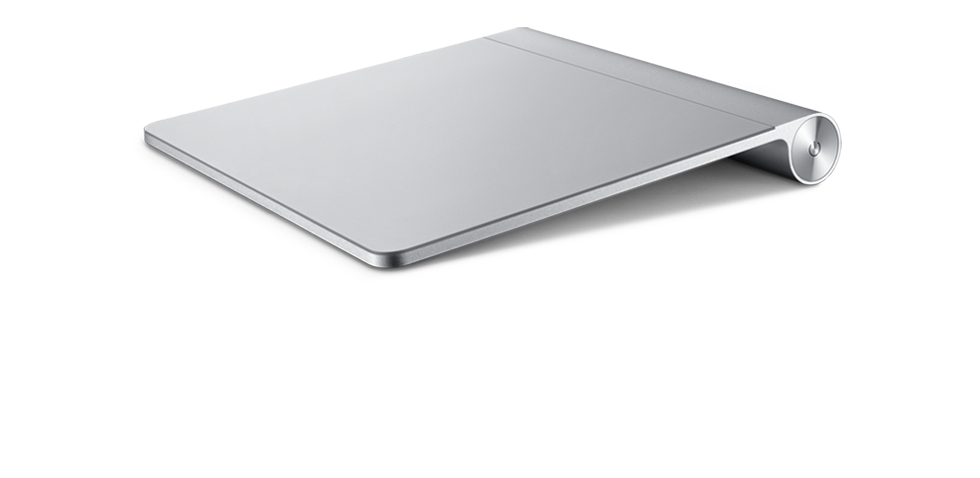
Having revolutionized device touch interface with the iPhone, iPod Touch and iPad, as well as by the inclusion of trackpads on their laptops that mimic the functionality, it stands to reason that Apple would eventually attempt to bring this fantastic feature to their other computers and even competing computers. The answer was the Magic Trackpad.
 The Magic Trackpad is really an aluminum trackpad, with a wear-resistant glass surface, very much like the trackpad on the Macbook and Macbook Pro laptops with two significant differences: it's wireless and about 80% larger than any other trackpad made by Apple. With a similar form factor to Apple's wireless keyboard, it's a great fit on your desktop:

One of the nice improvements in touch interface has been the development of multi-touch and the Magic Trackpad brings this feature to your desktop.
Overall, a fantastic device from Apple and the user feedback has been very positive. Score another one for Apple's innovative design team!

One of the nice improvements in touch interface has been the development of multi-touch and the Magic Trackpad brings this feature to your desktop.
Overall, a fantastic device from Apple and the user feedback has been very positive. Score another one for Apple's innovative design team!
Tuesday, August 3, 2010
Amazon fights back against the Kobo eReader
In a pretty clear demonstration that Amazon seriously believes that the Kobo eReader could potentially be a threat in the eReader market, released a new version of their Kindle at a price point to beat out the Kobo in price and features. With WiFi capabilities for $139US and 3G capabilities for $189, Amazon is putting more than the Kobo in jeopardy.


I still believe that one of the great features of the Kobo is the ratio of screen to controls, which leaves the device feeling more like a book than purpose-built computer or over-sized Blackberry. As others have said, the Kobo was relying on price point and access to a great library to win over a part of the market. Now that this strategy may no longer be valid, it will be interesting to see what comes up on that front.
Saturday, July 31, 2010
New iMac updates from Apple
Almost coinciding with the iMac's 10th anniversary, Apple has just released an updated version of their most popular computer. As updates have been appearing steadily in the last few months, it was expected that Apple would introduce some changes to one of their best-selling product lines.

As with the previous incarnation, Apple has maintained the sleek aluminium and wrap-around glass case, in the same dimensions, 21.5 and 27 inches. But now, all iMac have received a LED backlight update, as well as the introduction of IPS to a larger display. IPS, or In Plane Switching, is one of the technologies developed for the iPhone 4, which was deemed of high enough value to warrant its inclusion in desktop computers. IPS increases the angle of view of LCD monitors, allowing a similar quality of image whether from the front of the display or off to the side, providing a viewing angle of almost 178 degrees vertically and horizontally. Another interesting feature concerns specifically the 27 inch models; the screen resolution has been increased from the default 1920 x 1050 to a whopping 2560 x 1440, a 78% increase in number of pixels between a 27 inch and 21.5 inch display.

The display improvements don't end with the actual panel. Apple has chosen to upgrade the graphic processor, providing users with two choices, either the ATI Radeon HD 4670 with 256MB of dedicated memory or the ATI Radeon HD 5670 with 512MB of dedicated memory. But for the 27 inch model, the choices are even better. The same ATI Radeon HD 5670 with 512MB of memory or the ATI Radeon HD 5750 with 1GB of GDDR5 memory. As a side note on graphics, all iMacs now feature:
One of the expected upgrades was, as can be expected, with the processor architecture.
 With the inclusion of the i5 and i7 processors in the Macbook Pro line, it was to be expected that this processor line would make it over to the iMac. The base model is now available with one of these choices:


As with the previous incarnation, Apple has maintained the sleek aluminium and wrap-around glass case, in the same dimensions, 21.5 and 27 inches. But now, all iMac have received a LED backlight update, as well as the introduction of IPS to a larger display. IPS, or In Plane Switching, is one of the technologies developed for the iPhone 4, which was deemed of high enough value to warrant its inclusion in desktop computers. IPS increases the angle of view of LCD monitors, allowing a similar quality of image whether from the front of the display or off to the side, providing a viewing angle of almost 178 degrees vertically and horizontally. Another interesting feature concerns specifically the 27 inch models; the screen resolution has been increased from the default 1920 x 1050 to a whopping 2560 x 1440, a 78% increase in number of pixels between a 27 inch and 21.5 inch display.

The display improvements don't end with the actual panel. Apple has chosen to upgrade the graphic processor, providing users with two choices, either the ATI Radeon HD 4670 with 256MB of dedicated memory or the ATI Radeon HD 5670 with 512MB of dedicated memory. But for the 27 inch model, the choices are even better. The same ATI Radeon HD 5670 with 512MB of memory or the ATI Radeon HD 5750 with 1GB of GDDR5 memory. As a side note on graphics, all iMacs now feature:
- Mini DisplayPort output with support for DVI, VGA, and dual-link DVI (adapters obviously sold separately); 27-inch models also support input from external DisplayPort sources (adapters obviously sold separately)
- Support for extended desktop and video mirroring modes
- Simultaneously supports full native resolution on the built-in display and up to a 30-inch display (2560 by 1600 pixels) on an external display
One of the expected upgrades was, as can be expected, with the processor architecture.

- 3.06GHz Intel Core i3 processor with 4MB level 3 cache; supports Hyper-Threading
- 3.2GHz Intel Core i3 processor with 4MB level 3 cache; supports Hyper-Threading and Turbo Boost
- 3.6GHz Intel Core i5 processor with 4MB level 3 cache; supports Hyper-Threading and Turbo Boost
The 27 inch model is now available with one of these choices:
- 3.2GHz Intel Core i3 processor with 4MB level 3 cache; supports Hyper-Threading and Turbo Boost
- 3.6GHz Intel Core i5 processor with 4MB level 3 cache; supports Hyper-Threading and Turbo Boost
- 2.8GHz Quad-Core Intel Core i5 processor with 8MB level 3 cache; supports Turbo Boost
- 2.93GHz Quad-Core Intel Core i7 processor with 8MB level 3 cache; supports Hyper-Threading and Turbo Boost
Along with the improved processor choices, Apple has also updated RAM capacities, with all iMac now coming with a minimum of 4GB (two 2GB SO-DIMMs) of 1333MHz DDR3 SDRAM; although all machines feature four SO-DIMM slots to support up to a maximum of 16GB of RAM.
All models retain a Firewire 800 port, as well as 4 USB 2.0 ports and as with all new Apple computers:

All models have also gained an SDXC port to conveniently provide access to SD cards without the need for a separate card reader.

All in all, a well balanced set of updates. I look forward to my next trip to the Apple store to get some hands on experience with these new machines.
Friday, July 30, 2010
An iPad in the family...
Ever since the Apple iPad came out, my wife has been busy trying to determine if she should get one or not. I've watched her pour over reviews and comments, look through the Apple App Store to find applications she likes, browse various manufacturer's sites for accessories and so on. Well, this evening, she returned home with her very own iPad as well as the Apple dock for the device and an iTunes Store gift card!


In two shakes, the device was out of the box and after a few moments of fiddling, she was playing around with it. I imagine that the next few days should provide some interesting first hand information regarding its use.
as well as the Apple dock for the device and an iTunes Store gift card!Wednesday, July 28, 2010
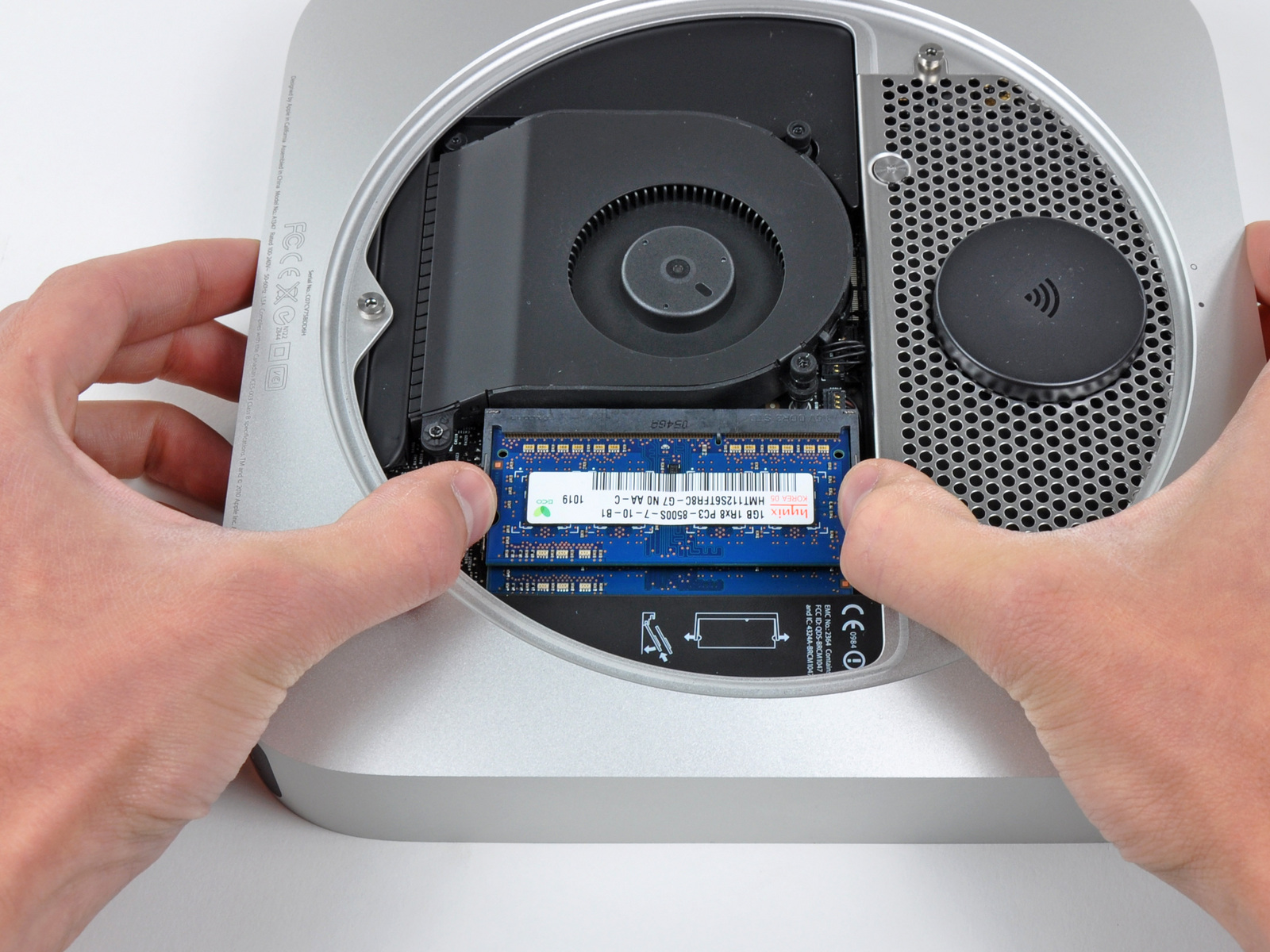
Inside look at the new Mac Mini
It usually doesn't take very long after a new piece of hardware is out that someone decides to take it apart. That was the case with the new Mac Mini , which iFixit was kind enough to tear down and document. Take a look at some of the pics they posted on the process:


, which iFixit was kind enough to tear down and document. Take a look at some of the pics they posted on the process:




Very nice indeed. You have to hand it to Apple, the hardware is always a step in the next direction!
Thursday, July 22, 2010
Update on the Kobo eReader
I am very happy to report that my wonderful wife, for our second anniversary, decided to get me my own Kobo and I thought that I would point out my experiences so far. The device is well packaged and comes with a single accessory, a USB cable (standard mini USB cable in white). The device is cradled in a combination of foam and cardboard, with a screen protecting membrane installed on the face.
I removed the device from the package, removed the USB cable and plugged the device into my wife iMac. It took a moment and the device mounted in the Finder. At that point, I discovered that the device contained a folder with both the Windows and Apple version of the Kobo Desktop software. I quickly installed the Apple version and looked over the functionality. Well, let me say, this version of the application lacks a little "polish".
After determining that I was unable to view the 100 free included books in the application, nor could I remove them, I ejected the device (which should be done with any USB data device) and looked it over. The free books were there and I took a few moments to open a few and browse, as well as to check the various features of the Kobo. At least the device itself is fantastic: easy to read screen, great format, light weight, easy to hold and with a secure feeling in hand.
I decided to install the Windows version of the application on my netbook and see if this version was a little more complete. Alas, it is the very same application. Feeling somewhat disappointed, I logged on to the Kobobooks website, created an account, and started exploring what was available. According to the site, I can add books to a personalized section labelled My Library, which would sync them to my Kobo Desktop software, which I would then use to transfer the books to my Kobo. Sounds simple enough, I thought. I looked through the free section and discovered that they were the very same books that I already had loaded on the device I had in my hand. I wasn't up to purchasing a new book, so I decided to determine if I could add books I currently had, many of which are in PDF format. I was aware that the device supported PDF display, but I was curious to see how well it would work. Since the device was available as a data drive, I dragged over a PDF file, ejected the drive and powered up the device.
The PDF file was available within the Document section of the device, and loaded up quickly and with great resolution. Basic PDF display commands were available, including the all important resize, which worked quite well. But that is when my troubles began. I decided to remove the PDF file from the device, first by connecting the Kobo back to the computer, letting the device mount and deleting the file from the drive. Several folders were now being displayed in the Kobo, including the PDF file I had dragged over.
The Kobo supports ePub and PDF formats at the moment, although the maker has hinted at further support down the road with firmware upgrades to the device. I have been downloading ePub files left, right and center to test with the device, since finding some advice online about using another application to send books to the device, called Calibre, which has been working a lot better for me than the Kobo Desktop.
I've been enjoying the device tremendously though; who could have thought that I would be able to carry hundreds of books in such a small and convenient device. I will post more concerning my experiences with this great device as I learn more about it from regular use. I can tell you that within a couple days of receiving it, I've already re-read The Adventures of Sherlock Holmes , The Most Dangerous Game
 and I am quarter of the way through The Count of Monte Cristo
 .
.
I removed the device from the package, removed the USB cable and plugged the device into my wife iMac. It took a moment and the device mounted in the Finder. At that point, I discovered that the device contained a folder with both the Windows and Apple version of the Kobo Desktop software. I quickly installed the Apple version and looked over the functionality. Well, let me say, this version of the application lacks a little "polish".
After determining that I was unable to view the 100 free included books in the application, nor could I remove them, I ejected the device (which should be done with any USB data device) and looked it over. The free books were there and I took a few moments to open a few and browse, as well as to check the various features of the Kobo. At least the device itself is fantastic: easy to read screen, great format, light weight, easy to hold and with a secure feeling in hand.
I decided to install the Windows version of the application on my netbook and see if this version was a little more complete. Alas, it is the very same application. Feeling somewhat disappointed, I logged on to the Kobobooks website, created an account, and started exploring what was available. According to the site, I can add books to a personalized section labelled My Library, which would sync them to my Kobo Desktop software, which I would then use to transfer the books to my Kobo. Sounds simple enough, I thought. I looked through the free section and discovered that they were the very same books that I already had loaded on the device I had in my hand. I wasn't up to purchasing a new book, so I decided to determine if I could add books I currently had, many of which are in PDF format. I was aware that the device supported PDF display, but I was curious to see how well it would work. Since the device was available as a data drive, I dragged over a PDF file, ejected the drive and powered up the device.
The PDF file was available within the Document section of the device, and loaded up quickly and with great resolution. Basic PDF display commands were available, including the all important resize, which worked quite well. But that is when my troubles began. I decided to remove the PDF file from the device, first by connecting the Kobo back to the computer, letting the device mount and deleting the file from the drive. Several folders were now being displayed in the Kobo, including the PDF file I had dragged over.
The Kobo supports ePub and PDF formats at the moment, although the maker has hinted at further support down the road with firmware upgrades to the device. I have been downloading ePub files left, right and center to test with the device, since finding some advice online about using another application to send books to the device, called Calibre, which has been working a lot better for me than the Kobo Desktop.
I've been enjoying the device tremendously though; who could have thought that I would be able to carry hundreds of books in such a small and convenient device. I will post more concerning my experiences with this great device as I learn more about it from regular use. I can tell you that within a couple days of receiving it, I've already re-read The Adventures of Sherlock Holmes
, The Most Dangerous Game and I am quarter of the way through The Count of Monte Cristo.
Tuesday, July 20, 2010
Pick of the week: Waterpebble
When I saw this little device, I thought it was pure genius. The Waterpebble is an elegant solution to learning to conserve water, our most precious natural resource, as well as energy, in the form of wasted hot water. Unobtrusive and quite clever, the Waterpebble sits near the drain, learns from your daily shower habits and indicates, using colored LED, your water consumption in comparison to a baseline you set.

It is also possible to reset the device and create a new baseline to improve on. Hot water use is the second highest energy consumer in an average household and this neat little device can help you reduce your expenses in a reasonable and simple manner.

It is also possible to reset the device and create a new baseline to improve on. Hot water use is the second highest energy consumer in an average household and this neat little device can help you reduce your expenses in a reasonable and simple manner.
Sunday, July 18, 2010
A look at the Kobo Reader
On one of our regular trips to Chapter's, I could not help but notice the rather large Kobo display that had been set up near the middle of the store. For your information, the Kobo is Chapter's/Indigo's attempt to rival the pretty established Amazon Kindle e-Reader. And a lot of people feel that they may have a winner on their hands. The Kobo is a pretty standard looking, e-ink based display device to read e-books. Like the Kindle, it links to an online bookstore for purchases, this time making use of the large, 2 million title library offered by Kobobooks. The average price is around $9 a book, but many free downloads are available.
With the device's internal 1GB memory and an SD slot that can accept cards up to 4GB, this gives the Kobo an average maximum capacity of 1000 books, which is a small library on its own. The device itself is quite plain, but up to the task it has been given:

I feel that the design is probably the least technologically intrusive of the current batch of e-book readers, but that may of course change with the introduction of the iPad.
The Kobo gets you started with a list of 100 classic books, free with purchase of the device, which at $149 CAN, could almost be considered a bargain. Another way to look at it is $1.00 a book and $49 for a reader, which seems practically fair! This is a better offer than any of the competing manufacturers and I hope it becomes a business practice for the others.
Head over to the site, or even better, head to Chapter's and have a look for yourself; it might be time to add this tool to your reading arsenal!
With the device's internal 1GB memory and an SD slot that can accept cards up to 4GB, this gives the Kobo an average maximum capacity of 1000 books, which is a small library on its own. The device itself is quite plain, but up to the task it has been given:

I feel that the design is probably the least technologically intrusive of the current batch of e-book readers, but that may of course change with the introduction of the iPad.
The Kobo gets you started with a list of 100 classic books, free with purchase of the device, which at $149 CAN, could almost be considered a bargain. Another way to look at it is $1.00 a book and $49 for a reader, which seems practically fair! This is a better offer than any of the competing manufacturers and I hope it becomes a business practice for the others.
Head over to the site, or even better, head to Chapter's and have a look for yourself; it might be time to add this tool to your reading arsenal!
Friday, July 16, 2010
My experience with the Blue Snowball
I've been using the Blue Microphones Snowball USB Microphone for the last two months and so far I have been rather impressed. I had been in the market for a new microphone for a little while; I was torn between the expense of a standard microphone and preamplifier setup and the ease of use and lowered expense of a USB microphone. Then only real drawback of a USB solution is the lower recording quality inherent to the devices currently on the market.
But the Snowball changed that; the recording quality rivals some of the lower end standard microphones, but the ease of use sets it in a category of its own. It really is a plug and play device and only requires slight system setting modifications to work on practically all home computers, whether Windows or OS X-based.
My only negative comment to date is essentially cosmetic: the shell of the microphone is made up of two sphere halves, connected at the midline and the resulting seam covered by a chrome-type sticker. This sticker has a tendency to come off regularly, though in most cases, it simply loosens on one end or the other. Nothing major and in no way does this impact the recording quality, but it's a visual annoyance nonetheless.
I can sincerely vouch for the worthiness of this microphone and for the price, I feel that it is an excellent value indeed. Highly recommended.
But the Snowball changed that; the recording quality rivals some of the lower end standard microphones, but the ease of use sets it in a category of its own. It really is a plug and play device and only requires slight system setting modifications to work on practically all home computers, whether Windows or OS X-based.
My only negative comment to date is essentially cosmetic: the shell of the microphone is made up of two sphere halves, connected at the midline and the resulting seam covered by a chrome-type sticker. This sticker has a tendency to come off regularly, though in most cases, it simply loosens on one end or the other. Nothing major and in no way does this impact the recording quality, but it's a visual annoyance nonetheless.
I can sincerely vouch for the worthiness of this microphone and for the price, I feel that it is an excellent value indeed. Highly recommended.
Sunday, July 4, 2010
Electrolux Design Lab
You may have heard of Electrolux before, a leading European designer of a variety of home appliances. Every year, Electrolux holds a design competition to help develop new ideas and concepts in this very competitive field.
 And although they have long been eclipsed as an appliance company by some of the larger corporations, many of the ideas generated during the contest are absolute genius! Take a look at this year's contestants and ideas and judge for yourself at Electrolux Design Lab.

Saturday, July 3, 2010
A great photo accessory
Photography can become a pretty gear and gadget intensive hobby, but one continued requirement has been power, usually in the form of batteries which eventually need to be charged. Welcome designer Weng Jie's brilliant concept:


Sometimes, you just have to appreciate people's ingenuity. Harnessing the power of light to power a device that is intended to record light. Truly elegant. Get the complete story here.
Friday, June 25, 2010
Lacie Starck USB 2.0 External HDD
Every once in a while, I find hardware that functions well, is well designed and looks good too. And that's exactly the combination I found with the Lacie Starck 1TB USB 2.0 External Hard Drive. Some of you might already be familiar with Philippe Starck, the world-famous designer and some of the beautiful works he has created during his career.
This latest cooperation between Starck and Lacie, the well-known hardware manufacturer, has resulted in a line of beautiful devices, including both portable and desktop models in several capacities, starting at 500 GB all the way to the latest 2TB model. This article concerns the desktop version of the hard drive.
The Starck hard drive is a 195 x 115 x 52 mm aluminium enclosure, built a beefy 3mm thick, with a sculpted, polished steel face featuring the Starck logo which is backlit and angled in such a way as to project the logo on the desktop in front of the device. Somewhat pointless, but original in its application:
 Another interesting point is that the entire front facade is actually touch-sensitive, with the capacity to recognize both light and hard touches and can be associated with different actions, from mounting hardware to launching applications. The easy to use Lacie Desktop Manager software lets you set these settings easily.


This latest cooperation between Starck and Lacie, the well-known hardware manufacturer, has resulted in a line of beautiful devices, including both portable and desktop models in several capacities, starting at 500 GB all the way to the latest 2TB model. This article concerns the desktop version of the hard drive.
The Starck hard drive is a 195 x 115 x 52 mm aluminium enclosure, built a beefy 3mm thick, with a sculpted, polished steel face featuring the Starck logo which is backlit and angled in such a way as to project the logo on the desktop in front of the device. Somewhat pointless, but original in its application:


One of the features that most appealed to me was the lack of a cooling fan; the thick aluminium shell is designed as a massive heat sink to keep the drive at a correct operating temperature, with little to no sound. That's a true blessing for audio recording and other uses where external noise is an issue. Like many other external desktop drives, an external power supply is required to operate the drive and this makes less of a portable solution. If this is a concern, the portable version of the Starck hard drives are bus-powered, but with correspondingly smaller capacities.

This is a USB 2.0 drive and most of the tests that have been run by third parties have demonstrated that this drive falls within the range of the faster hard drives currently available. That makes it an great candidate for more demanding users.

If you're looking for a new external drive, this might be the solution for you. Did I mention the great price and pretty universally positive reviews on this family of drives? Sounds like a good deal to me!
Sunday, September 20, 2009
New iPod Nano
Well, Apple has released a new generation of the iPod Nano, and once again, they've added features that make the device even more useful than it used to be. Taking a cue from the newly released third generation iPod Shuffle as well as the iPod Touch (and iPhone, of course), the new iPod Nano has incorporated many new features that set it above the average player. First is the Voice Over feature, which tells you the song name and who’s performing it without interrupting the music; it's available in over twenty languages, including: Chinese (Cantonese), Chinese (Mandarin), Czech, Danish, Dutch, English, Finnish, French, German, Greek, Italian, Japanese, Korean, Norwegian, Polish, Portuguese, Russian, Spanish, Swedish and Turkish.
 Second, the new Nano features a video camera with 640 by 480 pixels in H.264, up to 30 frames per second with AAC audio to boot! There are even some live effects which can be used with the video, including Sepia, Black and White, X-Ray, Film Grain, Thermal, Security Cam, Cyborg, Bulge, Kaleido, Motion Blur, Mirror, Light Tunnel, Dent, Stretch, and Twirl.
 But that's just the first part; one of the interesting sub-functionality of this setup is the addition of the microphone. Apple has thoughtfully added a voice recording functionality into the menu.
Apart from this new multimedia functionality, Apple has also added another often requested feature: an FM tuner, with a few additions thrown in of course. The feed feature identifies stations and songs (if the information is broadcast) which is always a nice way to find out about new music, and the Live Pause feature, which allows you to pause live radio broadcasts, and rewind up to 15 minutes! It's like a PVR, but for radio! A nice feature in my opinion. In the past, there have been accessories that provided the same function, but it's nice to have it built-in.
One of the nice things about the iPod series is the support for several high quality audio formats, including Apple's own AAC (8 to 320 Kbps), Protected AAC (from iTunes Store), HE-AAC, MP3 (8 to 320 Kbps), MP3 VBR, Audible (formats 2, 3, 4, Audible Enhanced Audio, AAX, and AAX+), Apple Lossless, AIFF, and WAV.
The Nano now sports a polished anodized finish in 9 different colours, including silver, black, red (from Apple only), yellow (from Apple only), blue, purple, pink, green, and orange:
 If you are in the market for a new MP3 player, head to your nearest Apple store, or any electronic retailer, and take a look at the new Nano. It might just be the one for you.
 Second, the new Nano features a video camera with 640 by 480 pixels in H.264, up to 30 frames per second with AAC audio to boot! There are even some live effects which can be used with the video, including Sepia, Black and White, X-Ray, Film Grain, Thermal, Security Cam, Cyborg, Bulge, Kaleido, Motion Blur, Mirror, Light Tunnel, Dent, Stretch, and Twirl.
 But that's just the first part; one of the interesting sub-functionality of this setup is the addition of the microphone. Apple has thoughtfully added a voice recording functionality into the menu.
Apart from this new multimedia functionality, Apple has also added another often requested feature: an FM tuner, with a few additions thrown in of course. The feed feature identifies stations and songs (if the information is broadcast) which is always a nice way to find out about new music, and the Live Pause feature, which allows you to pause live radio broadcasts, and rewind up to 15 minutes! It's like a PVR, but for radio! A nice feature in my opinion. In the past, there have been accessories that provided the same function, but it's nice to have it built-in.
One of the nice things about the iPod series is the support for several high quality audio formats, including Apple's own AAC (8 to 320 Kbps), Protected AAC (from iTunes Store), HE-AAC, MP3 (8 to 320 Kbps), MP3 VBR, Audible (formats 2, 3, 4, Audible Enhanced Audio, AAX, and AAX+), Apple Lossless, AIFF, and WAV.
The Nano now sports a polished anodized finish in 9 different colours, including silver, black, red (from Apple only), yellow (from Apple only), blue, purple, pink, green, and orange:
 If you are in the market for a new MP3 player, head to your nearest Apple store, or any electronic retailer, and take a look at the new Nano. It might just be the one for you.
Thursday, August 20, 2009
Our new kitchen gadget
My wife and I decided to purchase a kitchen appliance that I have heard a lot about, but never got a chance to try: a bread maker. And I've known several people who have had one, used it for a while, then put it in storage somewhere in the basement. Well, after doing a little research on the topic, I found one machine which met the majority of our requirements, the Cuisinart CBK-200:
 The fairly large box holds several items, including:
- The CBK 200 bread maker
- The loaf pan
- The kneading paddle
- A measuring cup for liquids
- A measuring spoon for solids
- An instruction/recipe book
In essence, the bread maker is a fairly simple machine; an enclosed oven with a mixing system within the baking pan. With some simple programming, a timer and a thermostat, the bread maker can mix the dry and wet ingredients, knead them into dough, let the dough rise in a temperature-controlled environment (for as little or a long as required by a specific recipe) and finally bake the dough into delicious bread. One of the nice features is the inclusion of a convection cooking system, which allows for more even baking temperatures, and nicer shaped breads.
The CBK-200 is similar to many other bread makers. It uses a horizontal pan with the mixing paddle in the bottom to make loaves up to 2 lbs in size. Where it differs is with the exterior cladding of the machine, which in the case of the Cuisinart, is stainless steel, as opposed to the more common plastic of competing machines. Several setting buttons allow the user to vary the size of the loaf, the overall browning of the crust, and most importantly, allow various preparation methods, from basic white bread, to whole wheat and more.
We used it this evening to bake a basic white bread, using ingredients to make a 2 lbs loaf. The whole process, from start to finish was done in 3 hours and 15 minutes. Since we took the dough out at the indicated time to remove the mixing paddle, our first bread's shape left a little to be desired. But the taste was fantastic! The crust was golden and crispy, and we wound up eating half of our first bread pretty quickly!
We will continue to experiment with our new purchase, and will comment on our successes and failures at baking bread at home.
 The fairly large box holds several items, including:
- The CBK 200 bread maker
- The loaf pan
- The kneading paddle
- A measuring cup for liquids
- A measuring spoon for solids
- An instruction/recipe book
In essence, the bread maker is a fairly simple machine; an enclosed oven with a mixing system within the baking pan. With some simple programming, a timer and a thermostat, the bread maker can mix the dry and wet ingredients, knead them into dough, let the dough rise in a temperature-controlled environment (for as little or a long as required by a specific recipe) and finally bake the dough into delicious bread. One of the nice features is the inclusion of a convection cooking system, which allows for more even baking temperatures, and nicer shaped breads.
The CBK-200 is similar to many other bread makers. It uses a horizontal pan with the mixing paddle in the bottom to make loaves up to 2 lbs in size. Where it differs is with the exterior cladding of the machine, which in the case of the Cuisinart, is stainless steel, as opposed to the more common plastic of competing machines. Several setting buttons allow the user to vary the size of the loaf, the overall browning of the crust, and most importantly, allow various preparation methods, from basic white bread, to whole wheat and more.
We used it this evening to bake a basic white bread, using ingredients to make a 2 lbs loaf. The whole process, from start to finish was done in 3 hours and 15 minutes. Since we took the dough out at the indicated time to remove the mixing paddle, our first bread's shape left a little to be desired. But the taste was fantastic! The crust was golden and crispy, and we wound up eating half of our first bread pretty quickly!
We will continue to experiment with our new purchase, and will comment on our successes and failures at baking bread at home.
Thursday, August 6, 2009
Amazon's Kindle has some competition from Sony
It was bound to happen. After the popular online book retailer Amazon introduced their ebook reader, the Kindle, it was just a matter of time before another manufacturer attempted to jump on the bandwagon of ebook readers. Well, Sony announced two new readers today, the Reader Pocket Edition and the Reader Touch Edition. Sony plans to have the devices out at the end of the month and with a pricing structure that puts it at the same price or just below the Kindle.
The Pocket Edition has a five-inch display, will be available is three colours for the moment, including navy blue, rose and silver, and is sized to fit in a jacket pocket or a purse. It will store about 350 standard eBooks and will last about two weeks on a single charge, if we are to believe Sony's claims.
 The Touch Edition is a little bit larger, with a six-inch display that you can control, as the name indicates with touch, using either your finger, a stylus or the virtual keyboard. The device will also includes a built-in Oxford American English Dictionary as well as Memory Card and SD card slots, for additional storage space. Sony has indicated that both models make use of an E Ink Vizplex electronic paper display, that according to Sony representatives, "mimics the look of ink on paper.
 The software provided will be compatible with both PCs and Apple platforms and allow users to read documents in several formats, including PDF, Word, BBeB and other text files. Sony has also created an eBook Store online, and new releases and New York Times bestseller titles will be priced at $9.99. The readers will also have access to the 1 million free public domain books that Google has currently digitized. What remains to be seen is Sony's response to the public pressure against their draconian DRM application.
It will be interesting to see what Amazon's response is to Sony's step into this market. I can only anticipate price reductions on current Kindle models, and perhaps some hardware revisions in the near future? It remains to be seen.
The Pocket Edition has a five-inch display, will be available is three colours for the moment, including navy blue, rose and silver, and is sized to fit in a jacket pocket or a purse. It will store about 350 standard eBooks and will last about two weeks on a single charge, if we are to believe Sony's claims.
 The Touch Edition is a little bit larger, with a six-inch display that you can control, as the name indicates with touch, using either your finger, a stylus or the virtual keyboard. The device will also includes a built-in Oxford American English Dictionary as well as Memory Card and SD card slots, for additional storage space. Sony has indicated that both models make use of an E Ink Vizplex electronic paper display, that according to Sony representatives, "mimics the look of ink on paper.
 The software provided will be compatible with both PCs and Apple platforms and allow users to read documents in several formats, including PDF, Word, BBeB and other text files. Sony has also created an eBook Store online, and new releases and New York Times bestseller titles will be priced at $9.99. The readers will also have access to the 1 million free public domain books that Google has currently digitized. What remains to be seen is Sony's response to the public pressure against their draconian DRM application.
It will be interesting to see what Amazon's response is to Sony's step into this market. I can only anticipate price reductions on current Kindle models, and perhaps some hardware revisions in the near future? It remains to be seen.
Subscribe to:
Posts (Atom)