Search This Blog

Showing posts with label Hardware. Show all posts

Thursday, September 15, 2011

Aliph Jawbone Era bluetooth headset

For the first time since I've started using mobile phones regularly, I decided to get a BlueTooth headset. To be honest, I've always laughed a little on the inside when i saw someone using one of these gadgets. Yet, I've used telephone headsets at work for more than 15 years now. I did a little research and discovered that two companies really seem to be leading this industry: Aliph and BlueAnt. 
After learning more about the specific features of each device, and reading several reviews I settled on the Aliph Jawbone Era.
I think that i made the right choice; I have been blown away by several features of this great headset.
Aliph markets their headsets as the first "intelligent" devices in this category. What they imply by this is the capacity to incorporate apps within the headset, apps that provide added features to the user. And I found the approach brilliant; download and install the software, plug in the headset through USB and navigate to the MyTalk website. After creating an account and logging in, the headset is automatically recognized and apps, voices and advanced features can all be configured and uploaded to the headset!
Another first is the addition of an accelerometer which allows the user to use various gestures to control the headset. A simple double-tap and calls are answered and another double-tap hangs up (yes, very mich like a communicator is Star Trek!) 
The built-in voice prompts also help to make this a truly handsfree solution; incredibly,as I mentioned previously, it is also possible to update the voice to one of several choices, as well as voices in several other languages!
The headset is not the smallest made but at a little over 8g, it's barely noticeable. Aliph provides several fitting options as well as an ear loop for hard to fit users. Charging the headset is done through a micro-USB port on the earpiece end of the device.
Pairing the headset to a Bluetooth device couldn't be easier. Just give the headset a double shake-shake and it enters pairing mode. Alternatively, press the single button while turning the headset on to do the same. The Era supports up to 8 pairings and can also switch between two active devices.
Overall, I feel that the Era is entirely worth its price and provides outstanding quality and features and I'm sure you will feel the same way!

Friday, September 9, 2011

Received my Arduino UNO

After reading a number of Make: Projects that included an Arduino microcontroller, I decided that I needed to take the plunge and order one and see what I could build with it. I decided to order from The Robot Shop, as they had the best selection of Arduino models by far and great customer feedback.
I had previously downloaded the Arduino environment for OSX and was looking forward to trying some of the small programs I had composed. After getting home with my package, I pulled out a USB cable I had lying around and connected the UNO to my MacBook. I was able to upload my first test program in a few moments and got it to work flawlessly!

So now, time for some more interesting applications! I will post any future experiments and creations!

Tuesday, September 6, 2011

Linksys E2500 wireless router

As it regularly happens with home routers, our trusty Linksys wireless router bit the dust the other day! Still works as a switch, so it will wind up in the storage closet for use in some project or other! Being satisfied with the performance of the previous model, I decided to stick with Linksys/Cisco and picked up a Cisco e2500

This is a dual band 2.4gHz/5.0gHz wireless b/g/n router with four port switch. A proclaimed increase in bandwidth and speed due to the dual band nature of the router has been somewhat true, but I suspect that this has to do with wireless n more than anything else, as our previous Linksys was wireless a/b/g only.

So far, I've noticed that it runs rather warm. Nothing alarming but never a good thing either! The AC adapter has reduced in size, which is something that is always appreciated, as our router is connected to a UPS and several devices have rather large power connectors.

Simple setup and good performance are all I required. If you are in the market for a new wireless router, take a look at the e2500.

Sunday, September 4, 2011

Steri-Pen Journey LCD water purifier

Water purification is something of an obsession with me. I must have at least 6 mechanisms for providing clean drinking water and I still don't think that too many! I've used pretty much every method, from iodine tablets (which leave a pretty nasty taste that is hard to disguise) to chlorine and other chemical solutions (usually chlorine dioxide, which also leaves a pretty nasty taste!), filters (ceramic element, carbon element, activated charcoal and so on), reverse osmosis and even distillation. All of these methods provide clean and mostly sterile water. I say mostly sterile, as only a few of these methods are truly capable of getting rid of any organic matter and there are some rather small life forms on this planet, which tend to be far worst than the largest lifeforms!

But a new mechanism has been added to this collection of methods: UV sterilization! SteriPen, a company based out of the US, now offers several models of portable UV sterilizers for travel and outdoor use. The concept is simple; a handle to hold batteries and a glass shrouded UV lamp on a rubber stopper that is inserted directly into the hole in a standard water bottle. A press of the button initiates a timed session and the UV lamp is turned on, while swirling the water around, insuring sufficient dwell time for the entire volume of water. And presto, the water is ready to drink, with no waiting!

The model we picked up is the Journey LCD, which offers the simplicity of an icon driven operation through an LCD display on the handle of the device.

Simply pick your mode, insert into water supply, agitate and follow the timer on the screen. Couldn't be any easier and with two special detection pins, if for some reason the water is not in contact with the sterilizer, the process is interrupted and the result is displayed on the LCD.

A great addition to my little collection! If you are heading on a trip to a location with doubtful water, this might be a great tool for you.

Saturday, September 3, 2011

Sony Experia Mini Pro

I had been in the market for a new mobile for a while but simply could not find any device that "tickled my fancy" so to speak! The current trend in smartphones has left most mobile users with one of three choices: an oversized iPhone clone, with dual processor, 3D displays and no battery life, a Blackbery model of one kind or another and whY I like to call the "relics", those few devices that could be considered practically ancient in this fast moving industry. 
Then I set my eyes on the new Sony Xperia Mini Pro and found the device I had been looking for all this time! 
Finally, a smartphone in a smaller form factor and a slide out QWERTY keyboard!
This is the second generation of Sony's Mini Pro and it has received numerous updates. Powered by a 1gHz processor, the Mini Pro also runs the latest Android OS (Gingerbread) and offers the standard bells and whistles, including HD still and video camera, GPS, capacitive multitouch-capable screen and removable battery (a feature sorely lacking in most smartphones!)
Sony, the old masters of the proprietary technology, seem to have embraced a number of standards, specifically the use of mini USB for charging and a 3.5mm headphone jack, as well as support for the most common media formats for sound and videos!
The form factor really sets this phone apart from the rest, as it can truly be used with one hand if required. The use of haptic feedback on touchscreen keyboards one-ups Apple in this department! A short vibration to confirm each keystroke is simple genius!
A great mobile so far, but I will be sure to update this article once I've had a chance to use it a little more!

Friday, September 2, 2011

Lumix TS3 waterproof digital camera

At the end of July 2011, my wife, our boy and I decided to have our first family vacation. We decided on the Mont Tremblant resort, in Quebec, as it was close to home and the prices off-season were too good to pass up! As we both love photography, we figured that it would also be a great place to take some pictures. But when I started thinking about our luggage, the boy's luggage and all the other stuff we would lug around, I figured that a smaller, point and shoot type camera might actually be a good idea.

One of the subtypes of this camera made a strong impression with me: the waterproof, shockproof camera. There are only a few models currently available and after looking over the various specifications for these models, we settled on the Panasonic Lumix TS3.
The Lumix TS3 is a 12 megapixel camera, with several features including:

- Waterproof to 12m
- Shockproof to drops up to 2m
- Freezeproof to temperatures down to -10C
- Built-in GPS
- Built-in altimeter
- Built-in compass
- Built-in barometer

It also features a 28mm-128mm lens, as well as the capacity to capture movies in 1080p, at 30fps (it is also capable of capturing up to 60fps in lower resolutions. The camera is simple to use, but a little heavier than most point and shoots, due to the more rugged nature of the camera's body.


We put the camera through its paces on our vacation, taking it pretty much everywhere, and shooting in almost every condition we could think of. From underwater to the top of Mont Tremblant (~800m) in a single day, with temperatures ranging from 15C to a record 42C on one day of our vacation and the camera kept going with no difficulties at all! The only time unexpected issue we noticed was the condensation that formed on the inner glass of the objective, when we left our severely air conditioned room, to an outside temperature of 38C and a ride up to the top of the mountain, within about 15 minutes. As I was shooting, I realised that the scene appeared foggy on the 2.7 inch LCD display and noticed that the bottom portion of the glass cover was fogged up. Leaving the camera's waterproof battery/SD card door open, allowed the humidity to equalize and cleared up the fog.

Reading through the instruction manual, this is something that is discussed and is to be expected in the conditions we experienced.

Here are some samples taken with the TS3:


My beautiful wife!


The great pedestrian village of Mont Tremblant resort


And yours truly, being an idiot underwater!

If you are in the market for a camera you can take with you pretty much everywhere, the Panasonic Lumix TS3 is a model you should consider a serious contender!

Tuesday, March 8, 2011

Canon T2i DSLR

For my wife's birthday, I decided that I would spoil her a little by getting her a new camera. Her photography skills are beyond compare and I figured that she deserved to have a better camera at her disposal. She had been using a Canon Rebel XS for a little while and although a decent camera, some of the improvements made in the last couple years really dated her current device.


I settled on the Canon T2i for several reasons. The first and probably most important in my opinion was the transition from 12 bit images to 14 bit images; for the mathematically challenged, that may seem like a small change, but it's the difference between 2^12 number of colours versus 2^14 number of colours. That's an enormous difference for sure. Secondly, the T2i also includes HD video capabilities, at full 1080p resolution, with adjustable frame rates. That feature alone makes this camera far superior to the previous model. Thirdly, the improved speed of autofocus, startup, continuous shooting and more, really improve the camera's user experience.

Looking forward to seeing some more results from this camera, but as it was a gift, I guess I will have to wait and see what my wife will do with it; no doubt it will be amazing!

Tuesday, February 22, 2011

Wacom Intuos 4 tablet

After doing some research, I decided to purchase a Wacom Intuos 4 medium drawing tablet. A while back, I had purchased a small Wacom Bamboo drawing tablet for my wife, but one of the first things I noticed was that it was pretty small and not as responsive as I had expected. It was fine for occasional use, but I had decided that I wanted a larger drawing surface and better responsiveness.

After shopping around, I headed to Henry's in Ottawa as they were offering the best prices I had seen on Wacom products in the region and picked up the tablet. One of the first things to remark is that Wacom has taken care to produce an attractive looking and effective packaging solution.


One of the deciding factors on this specific model was the great software discounts for Adobe Photoshop CS5, almost 50% off the list price! Wacom has also included a very decent software package, which includes the following:

Nik® Color Efex Pro™ WE6
Wacom Brushes 3.0
Adobe Photoshop® Elements 8 for PC and Mac
Autodesk SketchBook Express® 2010
Corel Painter™ Sketch Pad
    I got home and unpacked everything. I wasn't exaggerating about the great packaging job that Wacom has done on this line of tablets. The box contains:


    The tablet
    The drawing stylus (or pen if you prefer)
    The mouse
    A weighted stand for the stylus
    10 extra nibs for the stylus
    A nib extractor tool
    A USB cable (standard to mini)
    A documentation package (which includes a driver CD, a quick start manual and a reference manual)
      I don't use a mouse with my Macbook Pro and I don't think this is about to change. Although the mouse is quite nicely shaped, with five fully customizable buttons, excellent resolution and battery-free operation, it's limited to the tablet surface to work and that quickly limits its use, in my opinion. I set the mouse aside and got everything else setup. I have to give some kudos to Wacom for the elegant design of the pen stand, which doubles as a storage container for both the extra nibs and the nib extractor tool.


      After installing the software (and let this be a general tip to less experienced computer users, always get the software installed and updated before plugging in the hardware; saves a ton of headaches afterwards) I plugged in the tablet. Another interesting design feature is the inclusion of two USB ports on the tablet, to allow the option of a proper cable orientation when used in right-hand or left hand mode. One of the most common complaints of Wacom's tablets was the general right-handedness of their devices. The new Intuos 4 models have resolved this issue by placing all of the tablets secondary controls on one side of the device. This allows the user to simply flip the tablet to allow both righties and lefties! The settings menu allows the user to switch modes and the tablets customizable OLED displays flip to the correct orientation.


      The displays themselves are truly useful, removing the need to memorize yet another set of custom controller parameters. The touch ring, another change to the Intuos line, has four modes, indicated by one of four small lights. This allows the ring to provide access to four linear-type functions, like zoom, brush size, canvas rotation and more.

      The tablet is incredibly responsive and a pleasure to use. The increased level of pressure sensitivity, together with very low starting weight (1 gram vs. 10 grams) really set this line apart from previous incarnations.


      If you've never tried a tablet, I highly recommend any of the models from the Intuos 4 line. If you already have a tablet, consider any of the models to be a great upgrade to the tablet you might currently be using. Really, a fantastic product!

      Sunday, February 6, 2011

      iPad Accessories: Twelve South's Compass Mobile Stand

      There is a secret amongst iPad users; Apple hasn't made a big deal of this secret and the legion of iPad users don't really want to talk about it. But here it is: iPad users are notorious accessory hounds! My wife is no exception (the Apple iPad case, the iPad dock, the wireless keyboard and even a stylus!), but that's just not enough for the diehard.
      Well, after browsing some accessories myself, hoping to find some inspiration for a gift for my lovely, I decided to purchase the Twelvesouth Compass stand. 
      A lot of manufacturers have discovered that the iPad, although a fantastic device, can be a little heavy in the hand. And furthermore, typing on the device without some kind of stand to place it at a more appropriate angle, can be a little frustrating. All manner of stands exist for it, but few are as elegant as the Compass. A sleek, steel and silicone item, the Compass has two possible positions: vertical as can be seen in the image above and horizontal (a perfect typing angle), seen below:
      Being made of steel (and with the potential to damage the iPad, were it stored unprotected with the tablet), Twelvesouth was kind enough to include a fitted case to carry the stand during travel. It is unusually heavy, although it is my belief that without this weight, the stand would not function adequately. A beautiful, well made item, this is an accessory that iPad owners need to look at closely. Head over to Twelvesouth's website and see the Compass and several other great products for Apple hardware.

      Friday, February 4, 2011

      Update on Apple's latest interface device

      After writing about Apple's Magic Trackpad, I decided that it might make a pretty decent Christmas gift for my wife and so, I headed over to our local Apple store to purchase one.


      Sadly, on Christmas day, we discovered that the multitouch functionality of the Magic Trackpad is only enabled on Apple computers running OS 10.6.4 and above, which meant that my wife's iMac would need an OS update additionally.

      Never one to refuse a trip to the Apple store, I purchased a copy of Snow Leopard and returned home. A quick, painless installation later, we plugged in the Magic Trackpad and as the name implies, it "magically" worked! The first thing we both noticed is how absolutely quiet computer use can become using this device instead of a mouse. No more dragging sounds, no more scrolling sounds, no more clicking sound. Period.

      The multitouch functionality is a great addition, allowing the user to perform a number of common actions easily. The various possibilities include:


      It's a neat addition to the way that you use a computer, although I have to admit that it does take a little getting used to, but I think that really is a question of how ingrained your computer interface habits are in you. But I find that the gestures tend to be natural motions to perform and shouldn't really pose a problem to anyone. Worth checking out the next time you're near an Apple store.

      Thursday, February 3, 2011

      More storage space...

      I've been a data "hound" for the last 20 years and that data takes storage space. I've gone through a series of external hard drives, which succeded each other as capacities rose and prices came down. But when I purchased my Macbook Pro, I realised that I would need an external drive that did not require an external power adapter (well, to be precise, I did not NEED, but did think it would be more convenient to be able to carry just a drive and adapter cable, rather than a drive, adapter cable, AC adapter and power cable). I had shopped around a little bit and settled on the Western Digital Passport Studio 500GB drive. The clincher for me was the USB2.0/Firewire 400/800 connection options.
      Another interesting feature is the eLabel, which WD touts as a simple method to distinguish several similar drives in your collection, as well as providing the user with a quick way to determine the amount of space left for data on the drive. Although the drive came with a pretty nice suite of applications from WD to simplify back ups, I decided to format the drive and use it exclusively as an Apple Time Machine drive.

      So far, I've found the drive both fast and quiet, which are obviously features that are desirable in a portable drive. I was also quite impressed that WD would include all three connection cables within the box (USB 2, Firewire 400 and Firewire 800). It has exceeded my expectations, except for one: total capacity. I would replace this drive in a second if it was available in a 1TB format, instead of the current maximum of 640GB.

      Wednesday, February 2, 2011

      And finally, a new Macbook Pro

      The moment I had been waiting for has finally arrived. Well, to be precise, the moment happened on the very last day of 2010 (way to stick it to the tax man!). I finally purchased a new computer: a new Macbook Pro 13.
      For those that know me, I don't purchase new computers very often. I continued trudging on with a rapidly dying, older generation iMac, then a radically underpowered Asus netbook, as well as using my wife's fairly new iMac. And none of those solutions were truly adequate. My iMac is far too loud (due to a defective HDD temperature sensor) to be used for anything other than basic browsing as well as being a pretty decent, if decidedly noisy, file, web and media server. The netbook is simply far too slow (and running Windows doesn't really help it gain points with me) and my wife's iMac is... my wife's iMac.

      I can easily say that my Macbook Pro is by far the best computer I have ever owned, bar none. It is decently fast (faster than anything else we have at home), well equipped (every feature that I could think of and Firewire 800 too) and absolutely beautifully designed and executed. The trackpad alone has completely changed my mind about the concept of trackpads, to the point that I have yet to plug a mouse into it. Multitouch, glass trackpads are simply the way to go, in my opinion.

      If you are in the market for a new computer, take a better look at the Macbook Pro line; there might be one in the series that is exactly what you are looking for as your next computer.

      Saturday, August 7, 2010

      Apple's latest interface device

      Having revolutionized device touch interface with the iPhone, iPod Touch and iPad, as well as by the inclusion of trackpads on their laptops that mimic the functionality, it stands to reason that Apple would eventually attempt to bring this fantastic feature to their other computers and even competing computers. The answer was the Magic Trackpad.

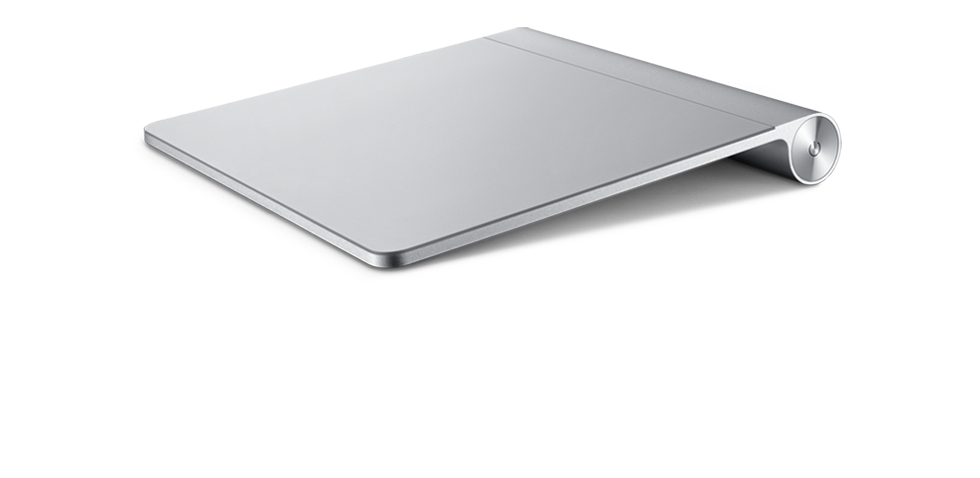
      The Magic Trackpad is really an aluminum trackpad, with a wear-resistant glass surface, very much like the trackpad on the Macbook and Macbook Pro laptops with two significant differences: it's wireless and about 80% larger than any other trackpad made by Apple. With a similar form factor to Apple's wireless keyboard, it's a great fit on your desktop:


      One of the nice improvements in touch interface has been the development of multi-touch and the Magic Trackpad brings this feature to your desktop.

      Overall, a fantastic device from Apple and the user feedback has been very positive. Score another one for Apple's innovative design team!

      Tuesday, August 3, 2010

      Amazon fights back against the Kobo eReader

      In a pretty clear demonstration that Amazon seriously believes that the Kobo eReader could potentially be a threat in the eReader market, released a new version of their Kindle at a price point to beat out the Kobo in price and features. With WiFi capabilities for $139US and 3G capabilities for $189, Amazon is putting more than the Kobo in jeopardy.

      I still believe that one of the great features of the Kobo is the ratio of screen to controls, which leaves the device feeling more like a book than purpose-built computer or over-sized  Blackberry. As others have said, the Kobo was relying on price point and access to a great library to win over a part of the market. Now that this strategy may no longer be valid, it will be interesting to see what comes up on that front.

      Saturday, July 31, 2010

      New iMac updates from Apple

      Almost coinciding with the iMac's 10th anniversary, Apple has just released an updated version of their most popular computer. As updates have been appearing steadily in the last few months, it was expected that Apple would introduce some changes to one of their best-selling product lines.


      As with the previous incarnation, Apple has maintained the sleek aluminium and wrap-around glass case, in the same dimensions, 21.5 and 27 inches. But now, all iMac have received a LED backlight update, as well as the introduction of IPS to a larger display. IPS, or In Plane Switching, is one of the technologies developed for the iPhone 4, which was deemed of high enough value to warrant its inclusion in desktop computers. IPS increases the angle of view of LCD monitors, allowing a similar quality of image whether from the front of the display or off to the side, providing a viewing angle of almost 178 degrees vertically and horizontally. Another interesting feature concerns  specifically the 27 inch models; the screen resolution has been increased from the default 1920 x 1050 to a whopping 2560 x 1440, a 78% increase in number of pixels between a 27 inch and 21.5 inch display.


      The display improvements don't end with the actual panel. Apple has chosen to upgrade the graphic processor, providing users with two choices, either the ATI Radeon HD 4670 with 256MB of dedicated memory or the ATI Radeon HD 5670 with 512MB of dedicated memory. But for the 27 inch model, the choices are even better. The same ATI Radeon HD 5670 with 512MB of memory or the ATI Radeon HD 5750 with 1GB of GDDR5 memory. As a side note on graphics, all iMacs now feature:

      • Mini DisplayPort output with support for DVI, VGA, and dual-link DVI (adapters obviously sold separately); 27-inch models also support input from external DisplayPort sources (adapters obviously sold separately)
      • Support for extended desktop and video mirroring modes
      • Simultaneously supports full native resolution on the built-in display and up to a 30-inch display (2560 by 1600 pixels) on an external display

      One of the expected upgrades was, as can be expected, with the processor architecture.
      With the inclusion of the i5 and i7 processors in the Macbook Pro line, it was to be expected that this processor line would make it over to the iMac. The base model is now available with one of these choices:

      • 3.06GHz Intel Core i3 processor with 4MB level 3 cache; supports Hyper-Threading
      • 3.2GHz Intel Core i3 processor with 4MB level 3 cache; supports Hyper-Threading and Turbo Boost
      • 3.6GHz Intel Core i5 processor with 4MB level 3 cache; supports Hyper-Threading and Turbo Boost


      The 27 inch model is now available with one of these choices:

      • 3.2GHz Intel Core i3 processor with 4MB level 3 cache; supports Hyper-Threading and Turbo Boost
      • 3.6GHz Intel Core i5 processor with 4MB level 3 cache; supports Hyper-Threading and Turbo Boost
      • 2.8GHz Quad-Core Intel Core i5 processor with 8MB level 3 cache; supports Turbo Boost
      • 2.93GHz Quad-Core Intel Core i7 processor with 8MB level 3 cache; supports Hyper-Threading and Turbo Boost
      Along with the improved processor choices, Apple has also updated RAM capacities, with all iMac now coming with a minimum of 4GB (two 2GB SO-DIMMs) of 1333MHz DDR3 SDRAM; although all machines feature four SO-DIMM slots to support up to a maximum of 16GB of RAM.

      All models retain a Firewire 800 port, as well as 4 USB 2.0 ports and as with all new Apple computers:


      All models have also gained an SDXC port to conveniently provide access to SD cards without the need for a separate card reader.


      All in all, a well balanced set of updates. I look forward to my next trip to the Apple store to get some hands on experience with these new machines.

      Friday, July 30, 2010

      An iPad in the family...

      Ever since the Apple iPad came out, my wife has been busy trying to determine if she should get one or not. I've watched her pour over reviews and comments, look through the Apple App Store to find applications she likes, browse various manufacturer's sites for accessories and so on. Well, this evening, she returned home with her very own iPad as well as the Apple dock for the device and an iTunes Store gift card!

      Apple iPad Tablet (32GB, Wi-Fi)

      In two shakes, the device was out of the box and after a few moments of fiddling, she was playing around with it.  I imagine that the next few days should provide some interesting first hand information regarding its use.

      Wednesday, July 28, 2010

      Inside look at the new Mac Mini

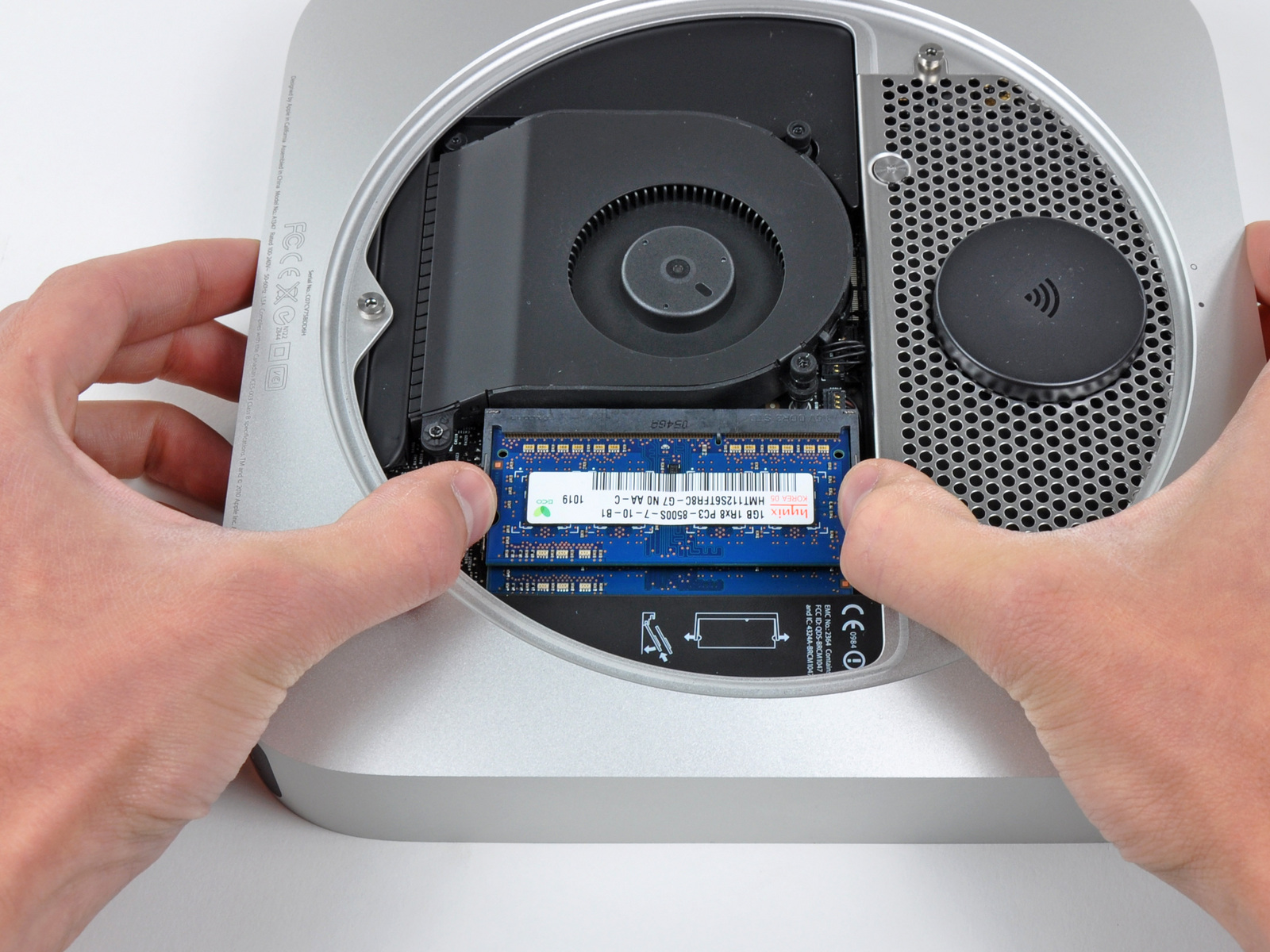
      It usually doesn't take very long after a new piece of hardware is out that someone decides to take it apart. That was the case with the new Mac Mini, which iFixit was kind enough to tear down and document. Take a look at some of the pics they posted on the process:


      Very nice indeed. You have to hand it to Apple, the hardware is always a step in the next direction!