Search This Blog

Wednesday, September 13, 2006

Apple is upgrading the iPod Nano and the iPod Shuffle..

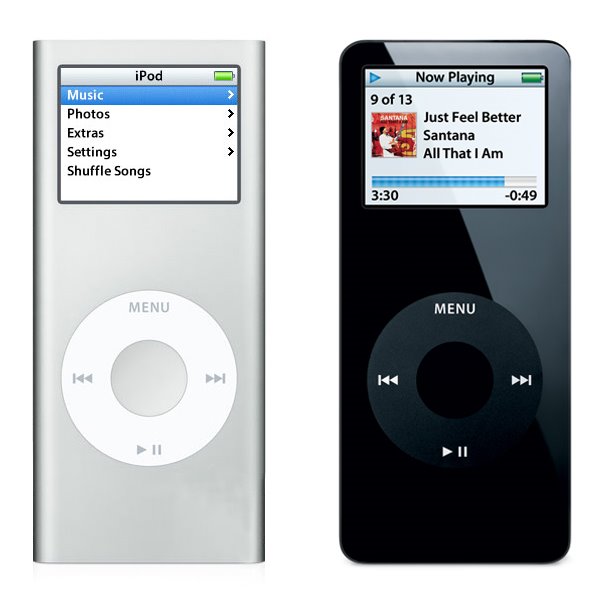
Apple announced some more hardware changes again today; the iPod Nano line is getting a full revamp. Very, very similar to the iPod Mini, the new Nano features an anodized aluminum outer skin, and capacities that include a 2GB, 4GB and now an 8GB model. The new device is also a little slimmer, measuring a measly 0.26" in thickness, although otherwise retaining the same dimensions as the previous incarnation of the Nano (3.5" high by 1.6" wide, with a weight of 1.41 ounces). Apple also claims that the new device has an increased battery life.

The following picture shows a side by side comparison, to scale, of the newer Nano on the left, and the first generation Nano on the right:

I own a first generation Nano, and I am very happy with it so far. I also have a first generation iPod Mini, and I also enjoyed it. I've come to expect Apple to update the iPod line on a regular basis now, and each time, they seem to come up with new innovations that keep them in the lead in this very aggressive market.

Let's see what they'll come up with next...

Monday, September 11, 2006

Replacing my Mighty mouse...

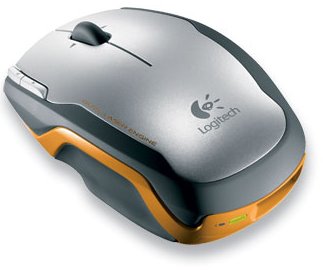
I had some mixed feelings about my Apple Mighty mouse, and since I have always eventually replaced the stock Apple mice with another device, I thought I might once again, try something new. Don't get me wrong, I think the Might mouse is not a bad mouse. Once you've tried the Scroll Ball, you'll have a hard time going without, but another device caught my eye, and now that I've had a chance to try it with my iMac, I think that I have found the replacement mouse I was looking for. The Logitech V400 Wireless Laser mouse is a great wireless pointing device:


Logitech has incorporated pretty much all of the current technology in wireless mice into this particular model. It uses a dual laser to apparently increase the level of precision, and the wireless portion uses 2.4GHz rather than 27MHz used in some other competing devices. I know what some of you may be thinking: "2.4GHz, hey that's the same as my cordless phone, wireless network and so on, won't there be interference?" Well, I have some wireless phone, a wireless network and I have yet to experience any issues with interference.

This mouse includes five buttons, a scroll wheel with side scroll capability and is a real pleasure to use. The buttons have an excellent feel (except the small accessory buttons, which are somewhat harder to use), and the track wheel is slight notched and provides just the right amount of tactile feedback. The mouse is a bit on the small side, and is marketed towards the business traveller, as Logitech states that this mouse is built using a rugged chassis, to survive the rigors of travel. Personally, I like that the wireless adapter stores in the back of the mouse, while serving to turn the mouse on or off. This can be a real blessing, as when the mouse is stored in this manner, you can be assured that it is off. I do not have any experience yet with battery life, but I have inserted the included Duracell AA battery (a single battery only), and I will report on the battery life.

Overall, a great device that I highly recommend!

Wednesday, September 6, 2006

New from Apple...

Apple announced a number of hardware changes today, starting with the iMac with 24" screen, which includes the new Intel Core 2 Duo, running at either 2.16 or 2.33GHz. The 24" iMac also includes something that several Apple users have complained about in the past, Firewire 800 (1 port), as well as a Firewire 400 port. Of course, as the new iMac makes use of the new processor family, the other iMacs have also been upgraded to the Core 2 Duo line of CPUs. The line now includes the iMac 17", with either the 1.83 or 2.00GHz processor, the iMac 20", with 2.16GHz processor and the aformentionned iMac 24", with the 2.16 or 2.33GHz processor.

As I had mentionned in a previous post, some changes were also made to the Mac Mini line, with changes to the processor familly, namely to the Core Duo processor. The line now includes the Mac Mini with 1.66GHz Core Duo processor without Superdrive or the 1.83GHz Core Duo processor with Superdrive. Of course, the only thing Apple is talking about is the change to the iMac line... It is the showstopper, and I think that it is reasonable to expect a 30" iMac at some point in the future, based on the existing monitor made by Apple.

Thursday, August 31, 2006

Unlocking the power of iTunes 2: Adding new visualizations

In our previous encounter, we learned about the various controls available from the keyboard in iTunes, specifically for controls related to visualizations... Well now, we need to learn how to add new visualizations to accompany the Visualizer provided by Apple.

This process is really broken down into two steps:

1. Locate and download a new visualization for iTunes

2. Move (or copy) the new visualization to the iTunes folder

There are several places to begin searching for new visualizations; an easy first choice is Google, followed by Apple's Downloads section. When one or more visualizations have been downloaded, it is time to move (or copy) them to the iTunes folder, in a specific place. The path to use is:

User folder / Library / iTunes / iTunes Plug-Ins


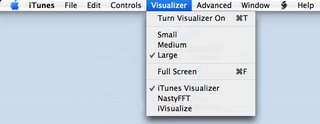
All new visualizations need to be placed within this folder. If iTunes was running, quit and relaunch the application, and the new visualizations should be available to select from the Visualizer menu, as can be seen in the image below:


Have fun and see what else is available; I've been really enjoying one called NastyFFT, a great real-time, colour-switching spectrum analyzer...

Keep in mind that using the path provided above installs the new visualizations for the active user only, and not every user on the system. In order to have visualizations available to every user, move (or copy) the visualizations to the following folder:

Hard drive / Library / iTunes / iTunes Plug-Ins

In our next installment, we will explore some options available using playlists and smart playlists!

Wednesday, August 30, 2006

Unlocking the power of iTunes 1: Visualization control

For those who have been using iTunes since it has come out, the following information might be old news, but for several new Apple users, this might be entirely new. iTunes is a fairly straightforward application to use, and most users, although proficient, are only aware of about 75% of what iTunes is capable of doing. This article will deal with the control of visualizations in iTunes. As you may already be aware, Apple has included a fairly complex, if somewhat psychadelic, set of visualizations for iTunes. These visualizations are built on a three concept: one layer, labelled the Visualization Form, a second layer, labelled the Visualization Effect and a third layer, labelled Visualization Colour. It is the combination of these three independant layers that creates the seemingly endless possibilities of Apple's visualizations.


But now that we are aware of these layers, a question that comes to mind is how many are there and are they listed? Well, yes, and someone has gone through the trouble of listing the contents of these layers at Winston's iTunes Cheet Sheet. Apple has thoughtfully provided several keyboard controls for iTunes that are simply not published for consumers. Some of these keyboard controls are specifically for the advanced control of visualizations.

The three following controls, which allow the user to toggle each layer independantly, is used to create a specific combination of layers to reach a desired visual effect. These controls are:

  • Q / W - toggle visualization "form"


  • A / S - toggle visualization "effect"


  • Z / X - toggle visualization "color"


Once a desired combination is reached, it can be frozen, or saved and assigned to a designated numerical key by using other commands. This can be an interesting addition for anyone using iTunes in a DJ setting, as it provides the ability to project a programmed visualization on cue. Here are these additional commands:

  • D - Reset Visualization to default


  • N - toggle Normal or high-contrast colors


  • M - Manually select config mode (user, freeze, random)


  • R- Randomly select config mode


  • C - display Current visualization config


  • NUM keys - user config presets (use SHIFT and # to record a preset)


Have fun experimenting with these settings. They can provide a new and interesting feature to a great media player like iTunes.

In the next installment, we will look at adding new visualizations to iTunes and where these can be procured...

New addition to Apple's Board of Directors...

In a press release announced today, Apple Computer Inc. indicated that Dr. Eric Schmidt was named to Apple's Board of Directors. With the addition of Dr. Schmidt, the Board of Directors now numbers eight, and includes:


  1. Fred D. Anderson, Partner, Elevation Partners and former CFO (Chief Financial Officer), Apple Computer, Inc.


  2. Bill Campbell, Chairman and former CEO Intuit Corp.


  3. Millard Drexler, Chairman and CEO J. Crew


  4. Albert Gore Jr., Former Vice President of the United States


  5. Steve Jobs, CEO, Apple


  6. Arthur D. Levinson, Ph. D., Chairman and CEO Genentech


  7. Jerry York, Chairman, President and CEO Harwinton Capital


  8. and

  9. Dr. Eric Schmidt, CEO Google


Dr. Schmidt has a long resume, which includes his current positions as CEO of Google, as a member of the Google board of directors, and finally, as a member of the Princeton University board of trustees. He was also formerly the CEO of Novell as well as the CTO (Chief Technology Officer) at Sun Microsystems Inc.

"Eric is obviously doing a terrific job as CEO of Google, and we look forward to his contributions as a member of Apple's board of directors," said Steve Jobs, Apple's CEO. "Like Apple, Google is very focused on innovation and we think Eric's insights and experience will be very valuable in helping to guide Apple in the years ahead."

Rumours of Mac Mini hardware update...

Rumours have been flying around about some proposed changes to the Mac Mini line. According to these latest rumours, Apple would keep the existing 1.66 GHz Core Duo model, and add a 1.83 GHz Core Duo model, while dropping the 1.5GHz Core Solo model. This decision would eliminate any Core Solo platforms from Apple's line of computers. No timelines have been indicated yet, but information is sure to leak out any time... Keep in mind that Apple did the same thing to the Mac Mini last year, without advertising the changes in hardware that were made to the model line. Several analysts have suggested that Apple has chosen to follow this strategy in order to liquidate inventory without having to resort to drastic retail price cuts.

More information can be found over at Think Secret, as well as lots of assorted news and rumours...

Tuesday, August 29, 2006

The 10,000 mark...

Today, my music collection has hit the 10,000 song mark... I know it may seem unimportant to many, but I have spent a lot of time in the development, improvement and maintenance of my music collection. Here are some statistics:


  • 10,052 songs,

  • 100% of songs are labelled by title,

  • 92% of songs are labelled by album,

  • 85% of songs are labelled by original track number,

  • 65% of songs have associated front cover artwork,

  • 75% of songs are part of a full album...

  • and finally, 88% of songs are over 192kbps bitrates, with almost 35% at 320kbps.


There are no duplicates in my collection, unless the same song is available on several albums. I know that many of you may think that I am encouraging media piracy by promoting my own collection. For these people, let me say that I do not share my own collection. I have downloaded a large portion of it, but I have also ripped another portion of it from my own CD collection.

I don't want to get into the whole debate, but suffice it to say, it is a milestone in any media collection, so I am happy to announce it!

Talk to you soon...

Monday, August 28, 2006

Using scripts with iTunes...

It has come to my attention that several friends of mine have been using iTunes as their primary media player for a little while now, and although many of them are PC users, there are a few that are Apple users. And it is for these people that I write today; I would like to teach you to add functionalities to iTunes using some pre-built scripts. These scripts are Applescripts, and they can provide you with the ability to make iTunes work exactly the way you want.

This is a three step process, so here goes:

1. The first step is to locate the folder user/Library/iTunes and insert a new folder labelled Scripts.

2. Locate some existing scripts; a great site for this is Doug's Applescripts for iTunes site. So far, they have over 400 scripts available for free download.

3. Once you've downloaded a few scripts, unzip them and copy the scripts to the Scripts folder created earlier.

A new icon becomes available in the iTunes menu; this icon allows a user easy access to the new functions provided by the scripts.

Have fun...

My impressions so far...

After using my new 20" Dual Core iMac for a few weeks now, I can safely say that I made a good purchase. Of course, as with any new system, I've encoutered some strange behaviour, but most of that has been dealt with. Last week, I removed the 512 MB of RAM installed in my system and replaced it with a Kingston KTA-MB667/1G stick of RAM; 1GB chip, with the option to install a second one later on. Although I don't have numbers to verify my claims, the system performs better as a whole; all applications launch faster, all Finder operations seem snappier than before. All in all, a wise choice to upgrade. The surprising part was that I got this memory upgrade from CompuSmart, of all places; they have been maintaining a small Apple section, and I will continue to go there because of this...

The upgrade is where one strange thing happened. The day before I upgraded my RAM, I found that my Airport hardware just seemed to vanish from the system. No amount of coaxing would get the hardware detected. I rebooted twice, to no avail. The following day, after installing the new RAM, I relaunched the system, and lo and behold, the Airport was back. I have no explanation, but I am happy that it is back.

I have also added an APC ES 650 UPS to my setup:
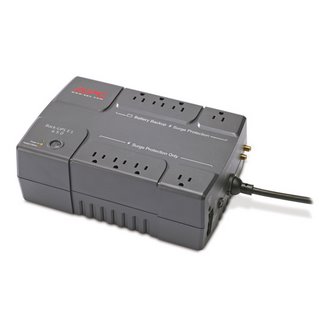

The easy to install software allows me to monitor the status of the UPS, as well as provide some parameters for safe shutdown of my system in case of a power failure. As the ES 650 provides 8 outlets (4 surge protected and 4 surge protected and UPS protected), I decided to connect my DSL modem, wireless router and iMac to the UPS side of things. Might as well protect my entire setup.

On the software side of things, I have installed MySQL, made some modifications to the PHP config file and installed Moodle, the open source LMS that I had experimented with in the past. The platform has truly matured and it is a really great application to play around with, especially in my professional field. My preliminary examination of the platform has yielded some great ideas for the future. I also took the time to install a new Preference Pane, that allows me to easily launch and shutdown the MySQL server. On another topic, I replaced the official BitTorrent client for Transmission, a freeware BitTorrent client, and let me say that Transmission has so far blown the pants right off the official client. I highly recommend this software, if only for its automatic management of ratios and seeding.

More news later...